The Wrist Glance Problem
If you wear a continuous glucose monitor (CGM), you know the routine. Pull out your phone, unlock it, open the app, check your glucose. Thirty times a day, sometimes more. You’re in a meeting, you’re driving, you’re cooking. Every time, the same motion.
The most natural way to check your glucose is a quick glance at your wrist. You don’t want to pull out your phone. You want to look at your watch.
But whether you get a watch app depends entirely on your sensor vendor. Neither Medtrum nor Abbott’s LibreLink has a Wear OS app. If your vendor doesn’t prioritize it, you’re out of luck.
Why This Matters
Diabetes doesn’t care about market size, engineering roadmaps, or platform priorities. It’s there every day, every meal, every night. CGM sensors are life-changing technology, but the software around them is built by companies with their own priorities, and watch apps apparently aren’t high on the list.
That’s a problem. Not a convenience problem. A daily quality of life problem for millions of people who just want to see their glucose without reaching for their phone.
This kind of technology should be available to every diabetic, regardless of which sensor they wear or which phone they use.
Open source can break that dependency. If the vendor won’t build it, the community can. That’s why I built GlucoseSync, a free and open-source CGM companion for Android and Wear OS.
How GlucoseSync Gets Your Data
Both Medtrum and Abbott have cloud platforms. Their phone apps read sensor data via Bluetooth and sync it to the cloud, where family members and caregivers can access it through “follow” apps. GlucoseSync connects to those same cloud APIs, so it can display your glucose data without needing direct Bluetooth access.
This approach has a trade-off: GlucoseSync depends on the vendor’s cloud being available, and there’s a short delay compared to a direct Bluetooth connection. But it also means GlucoseSync works with any sensor that has a cloud follow-up service, regardless of vendor. For users who self-host their CGM data with Nightscout, GlucoseSync connects directly to their own server.
What Is GlucoseSync?
GlucoseSync is a free, open-source app for Android and Wear OS that gives you your glucose data the way you want it: on your phone, on your wrist, with complications, charts, alerts, and pump data. It’s built with Kotlin Multiplatform, so an iOS version is on the roadmap.
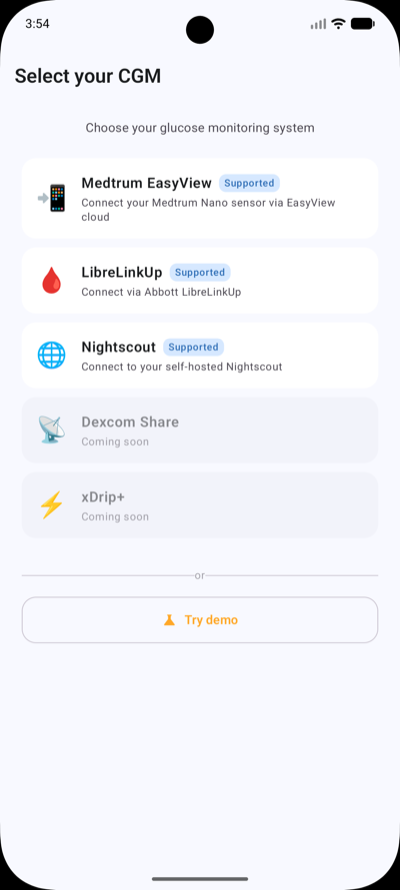
It supports five providers (Dexcom is coming soon):
- Medtrum via the EasyView cloud platform
- LibreLinkUp via Abbott’s LibreLinkUp cloud API (for FreeStyle Libre sensors)
- Dexcom — coming soon, via the Dexcom cloud API
- Nightscout via your self-hosted Nightscout server
- xDrip+ for cloud-independent local sync
The cloud providers support multi-patient carer/caregiver accounts.
The Phone App
The main screen is built around a single question: what’s my glucose doing right now?
A large hero card shows the current glucose value, a trend arrow (rising rapidly, stable, falling, etc.), and when it was last updated. Below that, a history chart with a configurable time range, with color-coded segments: green for stable, orange for moderate changes, red for rapid shifts. High and low threshold zones are shaded so you can immediately see when you’ve been out of range.
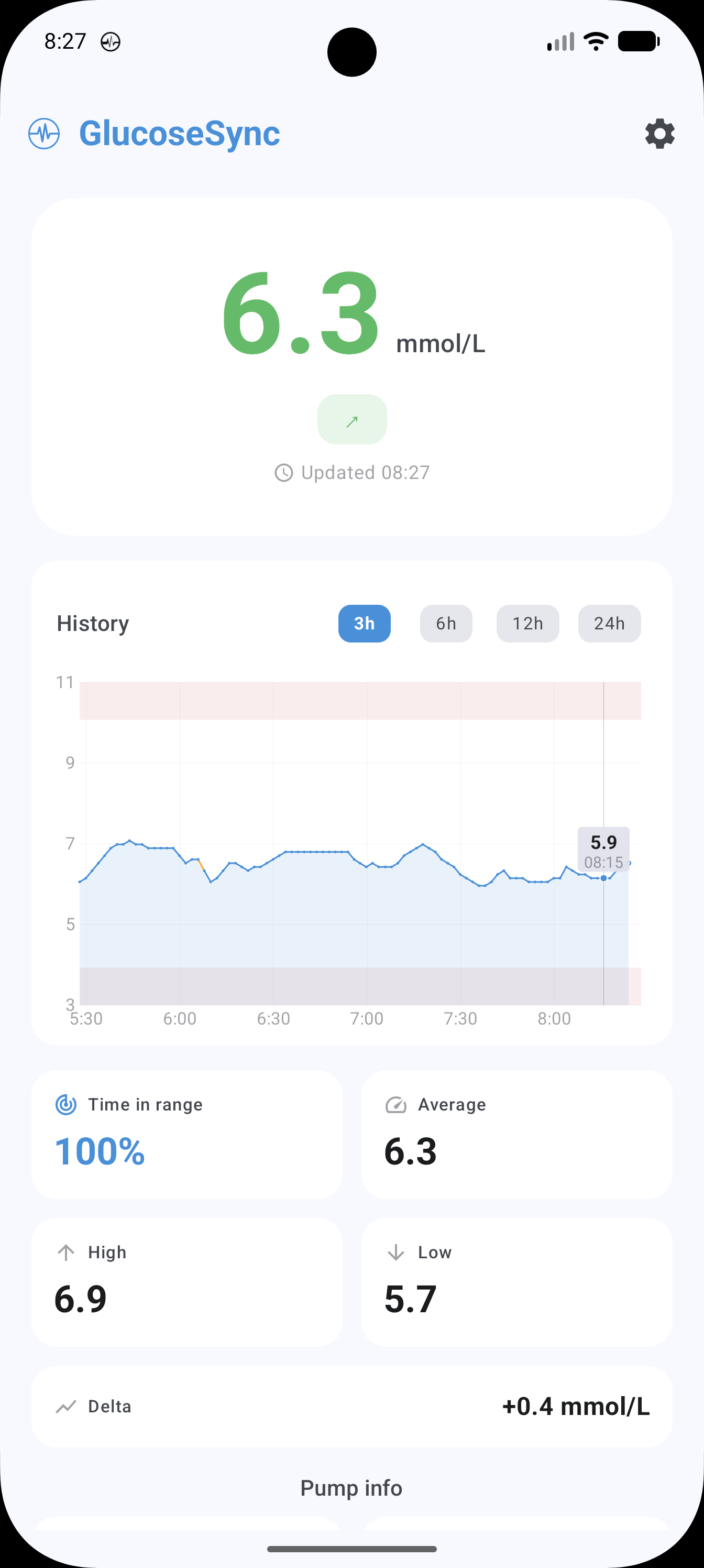
Statistics cards show time-in-range (TIR), average glucose, and configurable delta (change over 1, 5, 10, or 15 minutes). For Medtrum pump users, there’s a dedicated pump section showing IOB (Insulin on Board), basal rate, last bolus, and reservoir level.
The alert system lets you configure custom high and low thresholds with notification sounds and vibration. A foreground service polls every 5 minutes in the background, so you get notified even when the app isn’t open.
Wear OS and Complications
This is the part that started it all. GlucoseSync includes a full Wear OS app with five watch face complication providers:
- Glucose current value with trend
- Glucose + Delta value plus change
- IOB insulin on board (for pump users)
- Delta glucose change
- Sensor Battery battery percentage
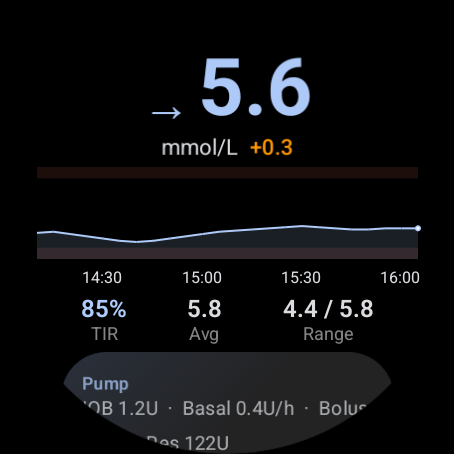
The watch app also shows a sparkline chart with the last 2 hours of data, stats chips for TIR and average, and a pump card. Pull-to-refresh triggers a message to the phone to fetch fresh data from the cloud.
Phone-to-watch communication uses the Wear OS Data Layer API. The phone pushes glucose data, pump info, battery level, and 2-hour history arrays as urgent data items. The watch persists everything so it survives app restarts.
Open Source, Open Access
GlucoseSync is free and open source under the MIT license. No subscriptions, no ads, no data collection. The source code is fully available, so anyone can audit it, contribute to it, or fork it for their own needs.
This matters because health technology shouldn’t be locked behind vendor ecosystems. If you’re using a Medtrum or FreeStyle Libre sensor, or running your own Nightscout server, GlucoseSync is there.
- Google Play: Download for Android and Wear OS
- GitHub: Source code and documentation